Connecting the field to the platform: end-to-end self-serve installation native mobile app.

Installer app
Role
Lead UX UI designer
Scope
Native mobile app
Duration
6 months · 2 iterations
1. Overview
ChargePoint runs one of the world's largest commercial EV charging networks. For its first decade it operated a direct-sales model a tight, managed deployment pipeline where every station activation was choreographed by an in-house team. ChargePoint shifted from direct sales to a VAR model four years ago. 90% of sales now run through resellers like EATON. The activation process never caught up.
The bigger picture
Two people, two completely separate worlds.
-
The electrician shows up on-site, mounts the hardware, scans serial numbers, confirms connectivity, and leaves. Everything through the Installer App - a mobile tool built for that physical, on-site job.
-
The org admin never touches hardware. They manage everything after - policies, pricing, activation - through Polaris Suite. Before this integration, those two worlds didn't talk. The station existed in the field but not in the platform.
Every handoff required a CX agent (Internal Customer Experience/ Deployment specialists).
2. Pain points
1. Electrician: No site/ org grouping
Installing 10 stations at the same location meant running the same flow 10 times. Every station was a standalone task.
2. CX: No ownership confirmation
Once the electrician completed installation, there was no automatic connection to the station owner. CX had to manually identify station owner and activate stations.
3. Ideation & iteration
Iteration 1
Iteration 1 · MVP
Mapping the handoff - what does the installer app need to know, and when?
The first challenge wasn't screens, it was flow. Before designing an integration, we had to answer: at what point in the physical workflow is org identity even knowable? We mapped the end-to-end deployment and identified three data gaps a CX agent was bridging.
-
Sites concept - a physical address becomes the unit of work, not individual stations
-
CMS (Charger Management System) declaration upfront - ChargePoint cloud or third-party (be.ENERGISED, Studio); the two paths diverge immediately
-
Org pre-assignment - org identity pushed from Salesforce, shown on the installer's summary as a read-only signal.
-
Email-triggered activation - regional link (US/EU/CA, Prod/QA) sent to the org admin when the job is marked complete.
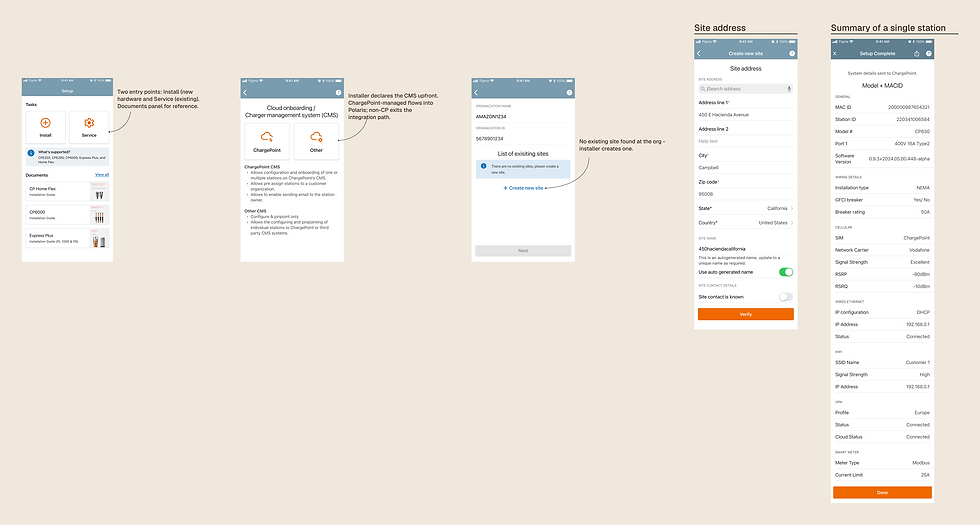

Design decision · CMS Selection screen
Why ask the installer at all?
ChargePoint hardware can be registered with a third-party CMS - be.ENERGISED, Studio, or any other back-end provider.
If the activation email goes out for a non-CP-managed station, the org admin lands in Polaris with a station that can never be activated there.
The CMS selection screen is a gatekeeping step: it forks the flow before any data is sent, so the wrong activation email never fires.
The trade-off
Adding a selection step at the start of every install adds friction. For the 90%+ ChargePoint-managed case, it's a redundant tap. We considered auto-detecting CMS from the hardware scan but API coverage was incomplete - non-CP hardware could still be provisioned in CP's cloud.
Internal stakeholder review
-
Silent pre-assignment failure - No error feedback when API org link broke. Installer saw "Org ✓" but admin received nothing.
-
No asset visibility - admin had no way to confirm what had been installed from Polaris Suite.
-
Per-station email doesn't scale - 30-station, site separate 30 separate emails. Still manual, just a different shape.
-
"450haciendacalifornia" (auto-generated string) as a default site name wasn't meaningful to the org admin; needed a clearer naming convention or mandatory rename prompt.
Iteration 2
Phase 2
Removing the dependency - install completes cleanly, org follows.
Iteration 01 exposed two problems: a per-station email model that broke down at scale, and an org pre-assignment flow that depended on Salesforce data that often wasn't there. Iteration 02 fixed both and merged what had been planned as a third iteration into one pass.
-
Job Summary screen - all installed devices grouped into one submit event. One activation per site, not per station.
-
Add more stations + Cluster devices - after commissioning the first device, installers can loop back and add each subsequent station to the same job before submitting. (A ChargePoint DC cluster is a central power system that distributes electricity out to multiple connected charging stations like hubs on a network.)
-
Org-agnostic completion - install finishes cleanly regardless of Salesforce data. Org queues in Polaris Suite "Ready for Activation" immediately; admin receives regional email hyperlink to add the stations to their org.
-
Pre-assignment API required finalised Salesforce data at install time - unavailable for ~30% of VAR/rush jobs. Removing the dependency was cleaner than improving the error state.

4. Admin activation queue
Polaris suite

5. Final outcome
The integration delivered one thing: a station commissioned in the field shows up in Polaris Suite ready to activate. No CX involved.
-
Enterprise accounts - org pre-assigned via API, admin's dashboard deep-links directly to their station
-
VAR channel (90% of sales) - regional activation link sent by email, lands directly in Polaris Suite
-
Both paths, same outcome - org admin activates on their own timeline
0 CX touches required on the self-serve happy path.
1 Activation event per site & org (not per station).
2 Paths supported: enterprise pre-assign + VAR hyperlink.
White-glove activation remains available - now as a chargeable premium service, not the default. That shifts agent cost from an operational overhead to a revenue line.
6. What two iterations taught me.
Each iteration forced me to release an assumption I'd been designing around. The belief that org identity had to be resolved at install time drove the first design into fragility. Letting go of that assumption made everything simpler and more robust. That pattern - finding the locked assumption, not just the surface problem - was the through-line across both rounds.
1. Design for the data you have, not the data you need.
The pre-assignment model assumed clean Salesforce opportunity data at install time. It didn't have it. Designing from what was reliably present - station MAC, site address, installer's job record - produced a flow that worked in the real world.
2. The handoff point is the design.
This integration was never really about screens - it was about who holds responsibility at each point in a multi-party workflow. Designing the handoff from installer to org admin explicitly (rather than routing it through a CX agent) was the single decision that made self-serve viable.
3. A PRD written without dev alignment is a scope risk in disguise.
The sites grouping concept - treating a physical location as a single activation unit - was in the PRD from day one and informed the first two iterations of design. It only surfaced as technically unfeasible during engineering review, after significant design work had been done around it. The back-and-forth between CX requirements and dev constraints that followed was expensive.
The lesson: requirements written large without first-hand engineering input aren't requirements - they're assumptions. Early alignment between PM, dev, and design on what's actually buildable would have caught this before it shaped the design direction.
4. Two user types in one flow means two jobs to honour.
The installer's job is physical - install hardware, confirm connectivity, leave site. The org admin's job is operational - manage the account, activate stations. Coupling them by requiring org identity at install time violated both. Decoupling honoured both.
7. The bigger picture
I didn't just design the field tool -
I designed what it feeds into.
The Installer App is not a standalone product. It's the upstream half of a two-part system - and the activation flow in Polaris Suite only works because this app captures the right data, in the right shape, at the right moment.
What this project taught me is that the most important design decisions often aren't visible in the UI at all. The choice to decouple org identity from the install event, to make the job record the unit of work rather than the individual station, to let the install complete cleanly even when Salesforce data wasn't there - none of those show up as screens. They show up as a flow that works reliably in the field, and an admin who gets a clean handoff without ever knowing how messy the upstream process used to be.
That's the contract I was designing. Not just the app - the seam between two worlds.
